Insights
Table Of Content
Key Takeaways
What Does "Restaurant App Development" Actually Include?
Build In-House, Buy SaaS, or Outsource — Which Fits Your Restaurant?
How Much Does Restaurant App Development Cost in 2026?
Cost by Region
Must-Have Features for a Restaurant App
The AI Layer: Predictive Ordering, Dynamic Pricing, and Voice Ordering
Omnichannel Order Aggregation and Ghost Kitchens
Beyond the App: QR Ordering 2.0 and WhatsApp-First Ordering
Security and Data Ownership — What Restaurant Chains Often Overlook
Integration Depth — Why POS, Kitchen Hardware, and Networking Expertise Matter
Getting Started
Frequently Asked Questions
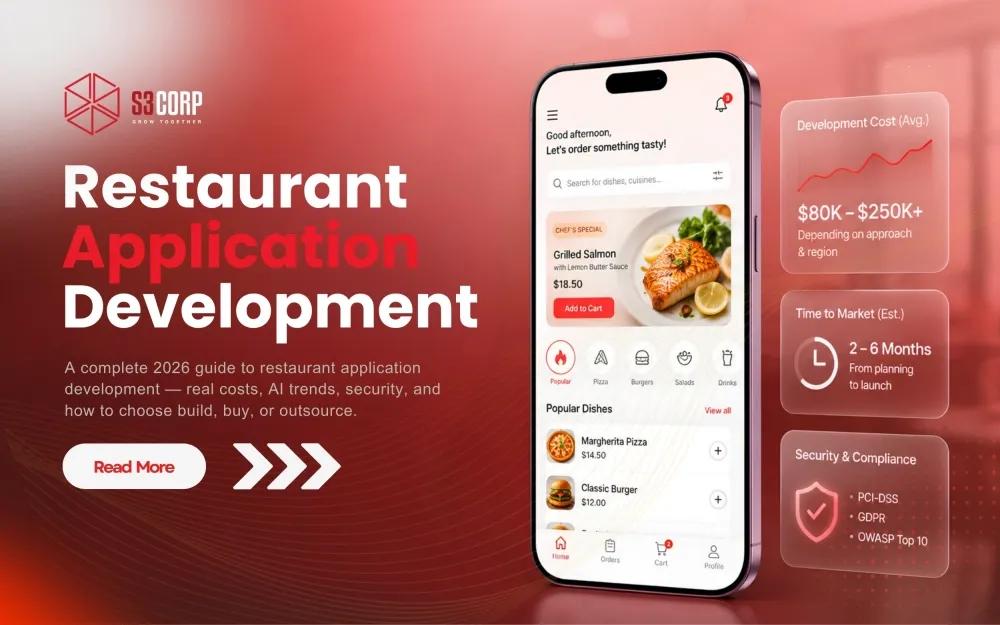
Restaurant App Development: The Complete 2026 Guide
A practical guide to restaurant app development in 2026 — real cost benchmarks, AI and ghost-kitchen trends, security and accessibility requirements, and how to choose build, buy, or outsource.
10 Aug 2026
Key Takeaways
- Restaurant app development gives you three real paths — build in-house, buy a SaaS platform, or outsource to a specialized partner. The right one depends on scale, integration needs, and how much control over customer data you actually need.
- Cost runs from roughly $8,000 for a single-location MVP to $150,000+ for an enterprise multi-brand platform. Developer location changes the total far more than feature count does.
- Outsourced development in Vietnam typically runs $25–$60 per hour, against $100–$250 per hour for senior US-based developers, without a proportional drop in delivery quality when you work with an established partner.
- POS, kitchen display, and IoT kitchen hardware integration is where most SaaS platforms and generalist agencies fall short. This is where deeper networking and embedded-systems experience earns its keep.
- Data ownership and security certification (ISO 27001, PDPA and GDPR readiness) matter more than most restaurant groups realize, usually right around the moment a SaaS vendor limits access to their own customer data.
- AI forecasting, dynamic pricing, and voice ordering are past the buzzword stage — 69% of US restaurants are adopting AI in some form in 2026 — but they only work if you own the data pipeline behind them, which is a common reason operators move from SaaS to custom development.
- Multi-brand ghost kitchens need an order-aggregation layer to avoid "tablet hell," and a growing share of ordering now happens with no app download at all, through browser-based QR ordering or WhatsApp-first ordering.
Restaurant app development means building or buying the software that lets guests order, pay, and reserve a table from a phone. You have three real paths to get there: build the app in-house with your own engineering team, buy a SaaS platform that hands you a template, or outsource development to a specialized partner who builds around the operation you already run. The right path depends on how many locations you operate, how much first-party customer data matters to your business, and how unusual your existing point-of-sale and kitchen hardware stack already is.
The food and beverage sector in Singapore puts a number on how much this decision matters. Online channels accounted for 25.1% of total F&B sales in October 2025, according to the Department of Statistics. In the United States, the National Restaurant Association projects total restaurant and foodservice sales will reach $1.55 trillion in 2026, with off-premise channels — delivery, takeout, drive-thru — continuing to grow as a share of that total. Digital ordering is not a nice-to-have feature anymore. It is the channel your guests already expect, and the question is only who builds it and who owns what it produces.
|
Path |
Best For |
|
Build in-house |
Companies with an existing technical team who want full ownership and have a year or more to invest before launch. |
|
Buy a SaaS platform |
Single-location operators who need to launch in weeks and can live with template constraints. |
|
Outsource to a partner |
Multi-location groups who want custom software, POS and hardware integration, and security certification, without hiring a full internal engineering team. |
This guide walks through what restaurant app development actually includes, breaks down the build-buy-outsource decision in detail, gives you real 2026 cost ranges by project tier and by region, and covers areas such as the AI layer, omnichannel order aggregation for multi-brand kitchens, app-less ordering, data security, and hardware integration.
What Does "Restaurant App Development" Actually Include?
Restaurant app development covers four connected pieces: a customer-facing ordering and reservation app, a restaurant-side management dashboard, point-of-sale and kitchen-display integration, and, for delivery-focused operators, a driver app. Most vendors build one or two of these well and treat the rest as an afterthought, which is exactly why so many restaurant apps feel disconnected from what happens in the kitchen.
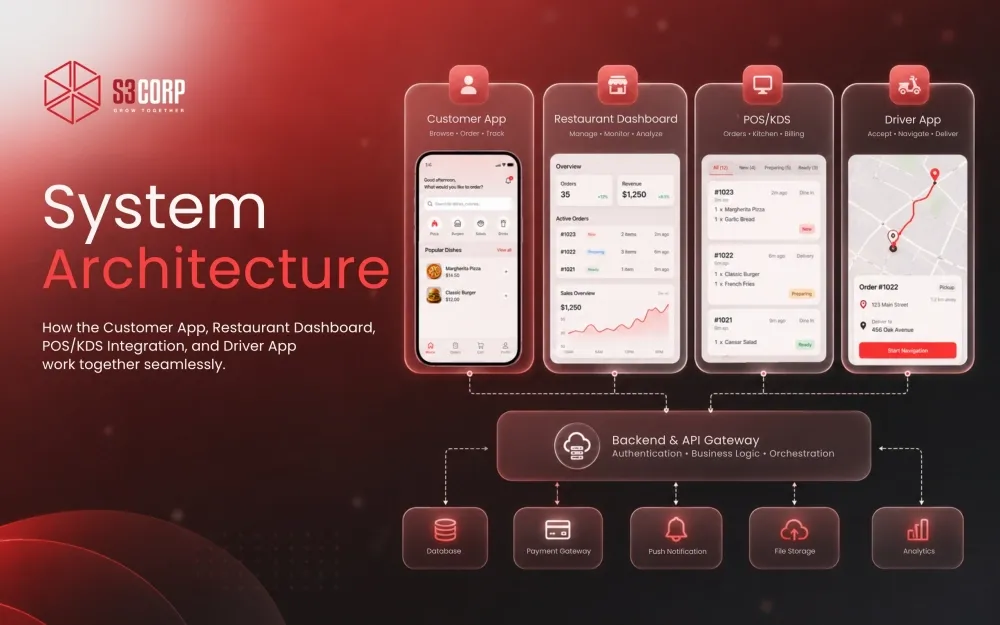 The customer app is the piece everyone thinks of first. This might include menu browsing, cart and checkout, table reservations, loyalty points, and push notifications. It is also the easiest piece to buy off the shelf, since every SaaS restaurant platform on the market builds a competent version of it. The restaurant-side dashboard is where operators manage menu items, pricing, and order flow — this is where template constraints start to bite, because your restaurant's actual workflow rarely matches a generic vendor's assumptions about how a kitchen runs.
POS and kitchen-display integration is the connective tissue between the app and the physical restaurant. When a guest places an order in the app, that order needs to hit the kitchen display system, decrement inventory, and post to the point-of-sale ledger without a staff member manually re-entering anything. This is also where most SaaS platforms stop: they support a short list of major POS systems and little else. If you run an older system, a regional POS provider, or hardware across multiple brands, this is the piece that pushes operators toward custom development.
|
Component |
What It Does |
Typically Owned By |
|
Customer app |
Menu, ordering, reservations, loyalty, notifications |
SaaS vendor, in-house team, or dev partner |
|
Restaurant dashboard |
Menu and pricing management, order flow, staff tools |
SaaS vendor (limited) or dev partner (custom) |
|
POS / kitchen display integration |
Connects orders to hardware and inventory in real time |
Dev partner (deepest capability) or in-house |
|
Driver / delivery app |
Route assignment, tracking, payout for delivery staff |
Dev partner or specialized delivery-app vendor |
If your restaurant runs delivery directly rather than through a third-party marketplace, you need a fourth piece: a driver app for order assignment, navigation, and payout tracking. Building this well requires real-time location handling and route logic, which is closer to full food delivery app development than to a simple ordering flow, and it is worth treating as its own project scope rather than a feature you bolt onto a customer app late in development.
Build In-House, Buy SaaS, or Outsource — Which Fits Your Restaurant?
Build in-house if you already have a technical team and want full ownership of the codebase and the roadmap. Buy a SaaS platform — the DoorDash Commerce Platform, Craver, Appy Pie, and similar tools — if you need to launch within weeks and template constraints do not bother you. Outsource to a specialized partner if you want custom-built software with POS and hardware integration and formal security certification, without carrying the overhead of hiring a full internal engineering team.
Total cost of ownership, not sticker price, is the right lens for this decision. Measured that way, a custom platform typically reaches break-even against ongoing SaaS subscription fees within two to four years for a multi-outlet operator — the upfront build costs more, but the per-order or per-location fees a SaaS vendor charges keep compounding for as long as you stay on the platform. What that framing usually misses is the biggest downside of a custom build handled entirely in-house: the multi-year hiring and management burden that comes with it. An outsourced partner delivers the custom-build advantage — full data ownership, no template limits, integration depth — while someone else handles the hiring, retention, and day-to-day engineering management.
|
Factor |
Build In-House |
Buy SaaS |
Outsource to a Partner |
|
Speed to launch |
Slow — 6 to 12 months to first build a team, then build the app |
Fast — typically 2 to 6 weeks |
Moderate — 2 to 6 months depending on scope |
|
Total cost |
Highest — salaries, benefits, tooling, management overhead |
Lowest upfront, but recurring fees scale with order volume |
Mid-range — project or dedicated-team cost, no long-term payroll burden |
|
Control over customer data |
Full |
Limited — data often stays inside the vendor's ecosystem |
Full — data ownership is a contract term, not a platform default |
|
Customization depth |
Unlimited, if you have the team to execute it |
Limited to what the template supports |
Deep — built around your actual POS and kitchen workflow |
|
Ongoing maintenance burden |
High — you own every bug, update, and security patch |
Low — the vendor manages the platform |
Moderate — typically covered under a support or dedicated-team agreement |
The decision usually comes down to two questions. First, is digital ordering a support channel for you, or is it core revenue infrastructure? A single café validating demand does not need custom software. A 15-location chain generating a meaningful share of revenue through its own app almost certainly does. Second, how much does first-party customer data matter to your marketing and retention strategy? If you plan to build loyalty programs, personalized promotions, or a unified customer view across locations, a SaaS platform that keeps that data inside its own ecosystem works against you from day one.
If outsourcing looks like the right fit, the next decision is engagement model — project-based delivery, a dedicated development team, or staff augmentation into your existing team. Each model trades off differently on control, speed, and cost, and the right one depends on whether you already have a product manager in-house or need the partner to own that role too. Collaboration models used by outsourcing partners generally cover all three, and a good partner will help you match the model to your actual internal capacity rather than pushing you toward whichever model is easiest for them to staff. For a broader look at how outsourced engagements typically run end to end, the ultimate guide to software outsourcing services covers the mechanics in more depth than this article has room for.
How Much Does Restaurant App Development Cost in 2026?
A basic single-location ordering app typically costs $8,000 to $40,000. A multi-location app with POS and loyalty integration runs $40,000 to $120,000. An enterprise multi-brand platform with advanced analytics and automation can exceed $150,000. The biggest driver of that spread is not feature count — it is developer location and integration depth.
Cost guides on this topic disagree with each other by a wide margin, some citing figures as low as $1,000 for a basic app. That number reflects pricing from years ago, or from an extremely stripped-down build with no real payment or POS integration — treat any 2026 quote under $5,000 for a functioning ordering app with skepticism. The clearer, more current figures cluster into three tiers.
|
Tier |
Cost Range |
Typical Timeline |
|
MVP (single location, basic ordering and loyalty) |
$8,000 – $45,000 |
2 – 3 months |
|
Mid-tier (multi-outlet, POS and CRM integration) |
$45,000 – $120,000 |
3 – 6 months |
|
Enterprise (multi-brand, advanced loyalty, analytics, automation) |
$120,000 – $300,000+ |
6 – 12+ months |
Within any tier, three factors move the number more than anything else. Platform coverage is the first — supporting iOS, Android, and a web ordering experience costs meaningfully more than a single platform, because each needs its own testing and optimization pass. Third-party integrations are the second — payment gateways, POS systems, delivery-partner APIs, and SMS or email notification services each add development and testing time, even when the integration itself is well-documented. Ongoing maintenance is the third, and the one operators most often underestimate: security patches, POS API changes, and feature updates do not stop once the app ships, and budgeting only for the initial build is a common way restaurant technology projects run over.
If you want a deeper breakdown of how these cost drivers stack for mobile projects generally, not just restaurant apps specifically, the mobile app development cost breakdown guide walks through the same variables — platform coverage, integration depth, and maintenance — in more technical detail.
Cost by Region
Developer hourly rates vary three to five times by region. A senior developer in the United States costs roughly $100 to $250 per hour. Comparable outsourced talent in Vietnam runs $25 to $60 per hour. That gap shows up almost entirely in total project cost, not in delivery speed or quality, when you work with an established partner rather than an unvetted freelancer. If you are a technical decision-maker comparison-shopping vendors across regions, though, this is usually the number that decides your shortlist.
|
Region |
Typical Senior Developer Rate (USD/hour) |
Context |
|
United States |
$100 – $150 |
Clutch pricing data places the broader US market range even wider once agency overhead is included. |
|
Vietnam (outsourced) |
$25 – $60 |
Roughly 40–60% below Eastern Europe and 60–75% below US/Western Europe rates |
|
India (outsourced) |
$15 – $40 |
Wide range reflecting a large talent pool spanning junior to senior specialists. |
|
Singapore (local hire) |
$50 – $80 |
Senior contract rates in Singapore run close to US rates, per 2026 Singapore developer rate benchmarks — Singapore is a mature talent hub, not a discount-pricing region. |
A rate gap like this tells you what a project costs. It does not, by itself, tell you anything about quality. What it does mean is that the same $80,000 budget buys roughly 400–800 hours of US development, or 1,300–3,200 hours of Vietnam-based development at comparable seniority — a difference that shows up directly in how much custom integration work, testing depth, and post-launch support that budget can actually cover. This is also why Singapore-headquartered restaurant groups increasingly build hybrid teams: a small in-house product function paired with an offshore engineering partner, rather than choosing one model exclusively. If you are weighing that specific tradeoff, nearshore versus offshore software development covers the timezone and communication factors that matter as much as the raw rate difference.
The tech sector in Vietnam has built a specific reputation over the past decade for combining competitive rates with strong technical depth, particularly in mobile and embedded systems work — a pattern several regional rate guides note independently.
Must-Have Features for a Restaurant App
Every competitive restaurant app needs online ordering, a photo-rich menu, table reservations, a loyalty program, push notifications, and integrated payments. Past that baseline, the features that actually move revenue — real-time inventory sync, POS-linked kitchen routing, personalized promotions — are the ones most SaaS templates cannot fully deliver.
That baseline list is table stakes — every serious restaurant app already has it, so there is little to gain from dwelling on it. What actually differentiates one restaurant app from another in 2026 is not whether it has a loyalty program — nearly every app does — but whether that loyalty program can share data across multiple brands under one holding company, whether inventory updates hit the app the moment a POS system marks an item out of stock, and whether kitchen routing logic actually reflects how your specific kitchen operates during a dinner rush.
|
Standard Features (any SaaS platform has these) |
Features That Need Custom or Integration Work |
|
Digital menu with photos and descriptions |
Real-time inventory sync tied to POS stock levels |
|
Online ordering and cart checkout |
Kitchen-display routing logic matched to your prep workflow |
|
Table reservations |
Cross-brand loyalty points for multi-concept restaurant groups |
|
Basic loyalty points and push notifications |
Location-based delivery zoning that adjusts to kitchen capacity |
|
Integrated payment processing |
Unified customer data and analytics across all outlets |
|
Accessibility |
WCAG-compliant, accessible ordering flow (screen readers, keyboard navigation, color contrast) |
The gap between the left and right columns is where restaurant technology budgets are actually won or lost. A single-location café rarely needs the right-hand column at all, which is exactly why a SaaS platform makes sense there. A 20-location chain running three different brands under one holding company almost always needs it, because a fragmented customer view across outlets caps how effective any loyalty or retention strategy can be. Building this kind of ordering system correctly draws on the same disciplines as broader e-commerce and retail development — cart logic, inventory sync, and payment orchestration are not restaurant-specific problems, they are commerce problems applied to a restaurant.
Accessibility belongs on that custom-work list for a reason beyond good practice: it is now a genuine legal exposure, not just a UX nicety. Federal website and app accessibility lawsuits under ADA Title III reached 3,117 in 2025, a 27% jump from 2024, with food service and hospitality named specifically among the industries seeing rising filings. Courts generally point to WCAG 2.1 AA as the practical benchmark for compliance. A template SaaS platform may or may not meet that bar out of the box, and there is often no easy way to check before you commit. A custom build gives you the ability to verify accessible UI/UX directly — screen-reader support, keyboard navigation, sufficient color contrast — as part of QA rather than discovering a gap after a demand letter arrives, which is the kind of check a properQA and testing process should catch before launch, not after.
The AI Layer: Predictive Ordering, Dynamic Pricing, and Voice Ordering
Restaurant technology moved past treating artificial intelligence as a buzzword sometime in early 2026. The 2026 research found that 69% of US restaurants are now adopting AI in some form — 44% already using it, another 25% planning to start within the year. Ask operators which category actually moves a number, though, and the answer narrows fast: an survey reported by Yahoo Finance found 58% of hospitality professionals expect AI forecasting and pricing tools to have the biggest operational impact in 2026, well ahead of contactless ordering at 25% or automated kitchens at 8%.
Predictive analytics is the quieter half of that shift, and the more immediately valuable one for margin. Instead of ordering inventory off last week's sales and a gut-check safety buffer, an AI forecasting layer pulls in weather, local events, and historical demand patterns to predict what a specific menu item will sell in the days ahead — item by item, not just "busy night" versus "slow night." Applied well, this kind of forecasting cuts food waste and tightens labor scheduling against actual predicted demand rather than a fixed weekly template. Dynamic pricing works the same data forward: adjusting menu prices by daypart, demand, or day of week the way airlines have for years, protecting margin during low-demand periods without discounting blindly — optimizing cost and performance across the whole menu rather than reacting item by item.
Voice ordering is the more visible AI application, and the adoption data tells an honest, unglamorous story rather than a hype-cycle one. Enterprise chains are moving fast — Yum! Brands has processed more than two million drive-thru orders through voice AI across 300-plus Taco Bell locations, Wendy's runs FreshAI across hundreds of stores, and Burger King began piloting an OpenAI-powered assistant across roughly 500 restaurants in early 2026. But roughly 21% of AI-assisted drive-thru orders still need an employee to step in, and only about 6% of operators overall currently use AI to take orders at all. The dominant 2026 model is AI paired with a human who can take over, not AI replacing a human outright — worth knowing before any operator budgets for full automation on day one.
None of this works, though, without the data ownership question raised earlier in this guide. Predictive analytics and dynamic pricing both depend on training a model against your restaurant's own order history, inventory patterns, and customer behavior — patterns a SaaS platform holding your data inside its own ecosystem often will not expose for you to build on. This is frequently the real reason a growing restaurant group moves from a template platform to custom, outsourced software: not a missing feature, but the need to own the data pipeline a genuinely useful AI layer requires. Building that pipeline correctly, with a strategic approach to how forecasting, pricing, and voice ordering connect back to POS and kitchen systems, is closer to AI application development than to a standard mobile build, and it is worth scoping as its own workstream rather than a bullet point added late to a feature list.
Omnichannel Order Aggregation and Ghost Kitchens
Multi-brand, delivery-only kitchens are no longer a niche experiment. The global virtual restaurant and ghost kitchen market was valued at roughly $91.6 billion in 2025 and is projected to keep growing at close to 15% a year through the mid-2030s, and a meaningful share of that growth is coming from operators running three, five, or more virtual brands out of a single physical kitchen.
The operational problem that growth creates has an actual name in the industry: "tablet hell." Without an aggregation layer, a kitchen running orders from DoorDash, Uber Eats, Grubhub, and a direct app juggles a separate tablet, and often a separate printer, for each channel — an arrangement that multiplies the chance of a missed order every time volume spikes during a rush. The fix is an order aggregation layer that pulls every channel into one feed, syncs menu and item availability across all of them the moment something changes or sells out, and pushes a single consistent order stream to the kitchen display system regardless of which brand or which platform an order came from.
For a multi-brand operator, this aggregation layer is not optional infrastructure — it is what makes running more than one virtual brand out of one kitchen actually work. Centralized, brand-level inventory tracking matters just as much as order aggregation, since shared ingredients across concepts make it easy to lose track of which brand is actually driving margin and which one is quietly eating into it. Building this correctly usually means real integration work at the API level, connecting delivery-platform APIs, your POS, and your kitchen display system into one pipeline — the kind of API development work that ties any set of external systems into a coherent internal workflow, applied here to a kitchen instead of a back office.
This is also where the build-buy-outsource framework earlier in this guide earns its keep for a multi-brand operator specifically. A SaaS platform built for one brand rarely handles multi-brand order aggregation cleanly, and building an aggregation and inventory layer in-house from scratch is a serious undertaking for a team whose core competency is food, not distributed systems. A partner who has already solved order aggregation and kitchen-display integration once can usually apply that same pattern again, with a scalable architecture that adds brands without a full re-platform each time, considerably faster than a from-scratch internal build.
Beyond the App: QR Ordering 2.0 and WhatsApp-First Ordering
Treating "the app" as a single downloadable, installable product is increasingly the wrong mental model. A large and growing share of digital ordering now happens without an app download at all, and for a number of markets — Singapore included — that is now the default expectation, not the exception.
QR Menu 2.0 is the clearest version of this shift. The 2022-era QR code that opened a static PDF menu has been replaced by a full ordering experience that runs entirely in a guest's mobile browser: scan, browse a visual menu, customize an item, pay, and send the order straight to the kitchen display system, with no app download at any point.
WhatsApp-first ordering is the second, related shift, and it is considerably further along in parts of Asia than most US-focused restaurant guides acknowledge. In markets where WhatsApp is already the default messaging app, letting a guest browse a menu, place an order, and pay without ever leaving that conversation removes friction that a native app install cannot match — and it sidesteps third-party marketplace commissions entirely, since the order comes in direct. For restaurant groups operating across Singapore, Southeast Asia, and other WhatsApp-heavy regions, treating conversational ordering as a core channel rather than an experiment is quickly becoming table stakes — the kind of innovative solutions work that separates a partner who understands the region from one porting a US playbook over wholesale.
The third piece of this shift is more specific to Apple's ecosystem, and worth a direct mention: iOS App Clips. An App Clip is a small, downloadable-free slice of a full native app that a guest launches by tapping an NFC tag, scanning a QR code, or clicking a link — opening straight into a native-feeling ordering flow with Apple Pay and Face ID or Touch ID built in, without ever routing through the App Store. Restaurant Business reported on a live 2026 deployment where a vendor embedded an NFC reader directly into a table lamp: tap the lamp with a phone, and the App Clip opens straight into ordering. Reported conversion lift from App Clips generally runs 35–50% higher than asking a guest to download a full app first, which matters most for exactly the low-commitment moment a restaurant table represents — nobody wants to install an app just to order one coffee. Android's equivalent, Instant Apps, has not kept pace: Google confirmed it is discontinuing the feature as of December 2025, which leaves iOS App Clips as the stronger no-install native option for now, with browser-based QR ordering carrying that same job on Android.
The practical implication for a restaurant group scoping custom development: a modern ordering system needs to be architected as a set of ordering surfaces — native app, browser-based QR ordering, and conversational ordering through WhatsApp or a similar platform — sharing one backend, one menu source of truth, and one order pipeline into the kitchen, rather than three disconnected builds. This is closer to progressive web app development paired with conversational AI development than to a single native app project, and it is worth scoping that way from the start rather than bolting a browser or chat ordering flow onto a native app after launch.
Security and Data Ownership — What Restaurant Chains Often Overlook
A restaurant app touches customer personal data, payment information, and — through POS integration — full sales data. SaaS platforms often keep parts of that data inside their own ecosystem, which matters directly for PDPA and GDPR compliance, and for any restaurant group planning to use customer data for retention marketing down the line.
This is the section most vendor and agency pages skip entirely, or reduce to a wall of compliance badges with no explanation of what they mean for a buying decision. Plenty of restaurant-app service pages list a dozen-plus compliance standards without ever connecting one back to what a buyer should actually ask a vendor. That gap matters because data ownership is not an abstract legal concern for a restaurant group — it directly determines whether you can build a unified customer view, run targeted win-back campaigns, or comply with a regulator's request to delete a specific customer's records across every system that touched their data.
Ask any vendor, SaaS or outsourced, these five questions before signing a contract:
- Who owns the customer database — you, or the vendor's platform? Get this in writing, not as a sales assurance.
- Where is the data physically stored, and does that location create any regulatory exposure under PDPA (Singapore), GDPR (EU/UK), or equivalent US state privacy law?
- Can you export your full customer and order history if you switch vendors, in a format you can actually use?
- What security certifications does the vendor hold, and do those certifications cover the specific system handling your data, not just the parent company?
- Who is liable in the event of a data breach, and what does the contract say about notification timelines and remediation cost?
Payment data deserves that question on its own, separate from general data storage. PCI DSS version 4.0.1 became the mandatory global standard for cardholder data security in 2026, and the single biggest lever for reducing your own compliance burden is tokenization — replacing the actual card number with a surrogate token the moment it enters the system, so raw card data never reaches your servers at all. Ask any vendor directly whether card data is tokenized at entry and whether their payment infrastructure is PCI DSS compliant — a vendor who cannot answer clearly is a vendor asking you to carry compliance risk you may not know you have.
Formal certification is the clearest signal a vendor takes this seriously. ISO 27001 certification, for example, requires an information security management system independently audited against a recognized international standard — it is not a marketing badge, it is a documented process for how a vendor handles access control, incident response, and data classification. A vendor with this certification has already answered most of the five questions above before you ask them. For a restaurant group planning any kind of customer loyalty or retention strategy, this is worth weighing as heavily as feature list or price, not as an afterthought item on a vendor checklist.
Integration Depth — Why POS, Kitchen Hardware, and Networking Expertise Matter
Most restaurant app vendors integrate with a handful of major POS systems and stop there. Chains running older or region-specific POS systems, kitchen display hardware, or IoT kitchen equipment often need a partner with deeper networking and embedded-systems experience, not just app-layer development skill.
This is the second gap that almost no competing guide addresses in any real depth. Most restaurant-app vendor pages mention POS integration as a single line on a features list, without ever explaining why it becomes a real technical problem at scale. Here is the concrete version of that problem: imagine a 12-location chain that grew through acquisition, where four locations run Toast, three run a regional POS common in Southeast Asia, and five run a legacy system the chain has not had a reason to replace.
Solving that problem well requires expertise that sits below the app layer entirely: understanding how kitchen display systems communicate over a local network, how older POS hardware exposes (or does not expose) an API, and how to build a middleware layer that normalizes data from five different systems into one consistent order pipeline. This is networking and embedded-systems work, not standard mobile development, and it draws on protocol-level knowledge that most app-focused agencies never needed to build. A technical bench with genuine depth in wire and wireless systems alongside standard application development is unusual among restaurant-app vendors specifically because most of them have never needed it; their clients tend to be single-brand operators on modern, well-supported POS hardware.
For a restaurant group evaluating vendors, the practical test is simple: ask any shortlisted partner to describe, in specific technical terms, how they would integrate with your actual POS and kitchen hardware — not with Square or Toast in the abstract. A partner who can only speak to the systems on their supported-integrations list will tell you a lot about how far their technical depth actually extends. If your infrastructure includes older systems or connected kitchen equipment, this conversation is also a natural entry point into IoT mobile app development, since kitchen hardware increasingly means connected devices, not just a terminal running static software.
Getting Started
The right path — build, buy, or outsource — depends on how many locations you run, how much you need first-party customer data for retention and loyalty, and how unusual your existing hardware and POS stack already is. None of those questions have a universal answer, and any vendor who gives you one without asking about your specific setup is optimizing for their own sales cycle, not your outcome.
S3Corp has built restaurant and hospitality-adjacent digital products for the regional market directly, including the development work behind HungryGoWhere and its companion iOS build, a restaurant discovery and dining platform serving the Singapore market. That kind of direct exposure to how dining and F&B platforms actually get used — not just how they get built — is the difference between a vendor who ships features and a partner who understands why a specific feature matters to a specific operator.
If you are early in scoping a restaurant or hospitality technology project and want a second opinion on whether build, buy, or outsource fits your situation, get in touch with the team at S3Corp for a scoping conversation — no pressure to commit to anything before you have a clear answer to the question that actually matters for your business.
Frequently Asked Questions
How much does developing a restaurant app cost?
A single-location app with basic ordering and loyalty features typically costs $8,000 to $45,000. A multi-location app with POS and CRM integration runs $45,000 to $120,000. Enterprise multi-brand platforms with advanced analytics and automation can exceed $150,000, largely depending on integration depth and developer location.
How do I develop a restaurant app?
Start by defining which of the three paths fits your situation: build in-house if you have an existing technical team, buy a SaaS platform if you need to launch within weeks, or outsource to a specialized partner if you need custom POS integration and full data ownership without a full internal team. See the build-buy-outsource section above for the full decision framework.
How do I develop a restaurant reservation app specifically?
A reservation-only app is a narrower build than a full ordering platform — it needs live table-availability logic, party-size and waitlist handling, and automated SMS or push confirmations, but does not require payment processing or kitchen-display integration unless you add deposit collection. Because the scope is smaller, a reservation-focused app typically falls at the lower end of the MVP cost tier.
Should I build a restaurant app in-house or outsource it?
Build in-house if you already have a technical team, want full long-term ownership, and can absorb 6–12 months of development time before launch. Outsource if you want custom software and POS integration without carrying full-time engineering payroll — most multi-location restaurant groups land here once they weigh total cost of ownership against a SaaS subscription's limits.
What does it cost to integrate a restaurant app with our existing POS system?
Standard integration with a widely supported system like Square or Toast is usually included in a mid-tier project scope. Integration with an older, regional, or non-standard POS system requires custom middleware development, which can add anywhere from a few thousand dollars to a meaningful share of total project cost, depending on how well-documented that system's API actually is.
Do I need AI features in a restaurant app in 2026?
Not on day one, but plan for it. The features with the clearest return — demand forecasting, dynamic pricing, and voice ordering for phone or drive-thru — depend on a data pipeline you control, so it is worth architecting your app to own that data from the start even if you launch AI features later. Bolting AI onto a SaaS platform that already limits your data access is usually the harder, more expensive path.







_1746790956049.webp&w=384&q=75)
_1746790970871.webp&w=384&q=75)